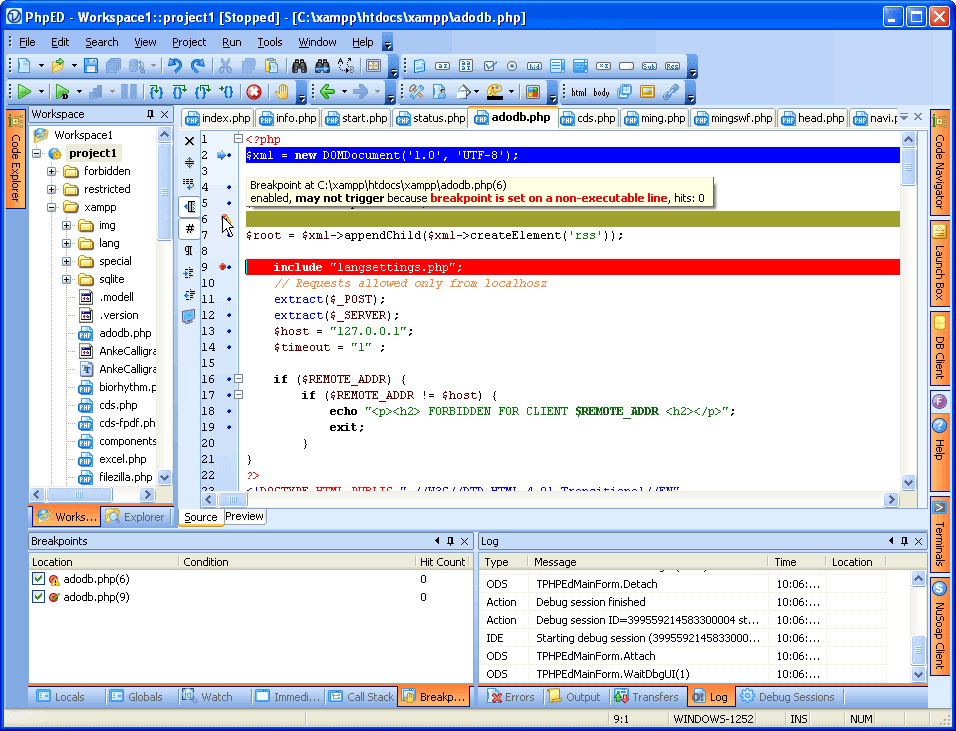
Breakpoints in PHP Debugger
Using Breakpoints in PhpED is quite straightforward:
- You can set the Breakpoints in the source opened in PHP Editor
- To edit Breakpoints properties, go to View->Debugger Window->Breakpoints.
- View->Debugger Window->Breakpoints is also used to set Global Breakpoint
However sometimes we get the questions about Breakpoints and
PHP Debugger. These are FAQ about Breakpoints.
Before going any further we strongly recommend to run
Project Setting Wizard in your Project - it helps
resolve the Breakpoint issues in most cases.
Why do my Breakpoints not work?
You set a breakpoint, but PHP Debugger doesn't stop at it. What could be wrong? Below
are the most common causes:
- The issue that we came across quite a few times: breakpoints are set in the editor, but
the script is started in the Run mode instead of Debug -- meaning debugger did not trigger
and was not aware of any breakpoints. It's clear that breakpoints work only when scripts are
running with debugger
- Also, very common issue: breakpoints are set on non-executable lines. PHP
interpreter processes the source and generates stop-points for certain lines of PHP code.
These lines have a blue dot next to them in the editor. Sometimes counter-intuitive but
true that some lines of your PHP code will not have these blue dots next to them, even
though you might think they should. For example: if/ and if/else, statements without
the curly braces won't have the blue dots except perhaps for the if itself. Another
potential "gottcha" for breakpoints is switch($variable) statements - switch will not
have a blue dot next to it. However, switch($myclass->mymethod()) or switch(myfunc()) or even
switch($var1=$var2) will have. Seems it's because there is an executable code
inside the condition part. This is a feature of PHP itself, whereas PhpED and its Php debugger just follow what the
PHP dictates.
- Another issue: breakpoints are set in the file that is neither executed nor even included
in the other php scripts being executed. It's clear that such breakpoints won't trigger.
- Similar to the above but a bit trickier: Breakpoints are in the file, that is executed
after current http request finished. It may for example be executed by Ajax call.
NOTE: if you have Debug session checked in Run menu, debugger will continue capturing
scripts and initiate debugging. But if this option is off, all scripts executed after
debugged script finished, will not trigger debugger and corresponding breakpoints will
have no effect.
- Last but not the least case relates to mapping. In this case debugger may not find
file on the remote host coresponded to the source file on local disk where breakpoint is set.
So breakpoint remains unresolved and debugger opens [Unmapped file] from the server
instead of local copy when you step into it. This situation and solutions
are explained
in this article
What are the best practices for using Breakpoints in PhpED?
- Set your breakpoints at the statements with blue dots. This way you will be sure that
PHP has generated stop-point and breakpoint will trigger. If blue dots aren't yet shown,
you can start debugging and proceed with step-in/step-over/step-out reach tp the file
where you want to set the breakpoints. When you reach the code in the file, blue dots will
appear immediately.
- Sometimes it is easier to start debugging by using NuSphere Debugger Toolbar.
You can open web site in an external browser, navigate to the target page and click Debug
button on the toolbar.
Troubleshooting of Breakpoints
If you are sure that the file with breakpoints is being executed but the breakpoints are still not working, chances are your file is being executed in the request different from your original debugger request and debug session is turned off. Firstly - turn on the debug session and check again. Other thing to watch for once the debug session is turned on:
- Check that the request to the file is on the same URL as the debugger request, with the same hostname and the same protocol. Switching from http to https will break the debug session! You can learn about debugging multiple domains here: https://nusphere.com/kb/technicalfaq/howto_run_dbg.htm
- Next - check that the cookies are enabled. Without the cookies debug session doesn't work.
- Check that you can debug up to the file where you set the breakpoint. If debugger opens file with [Unmapped remote file]
indication in the tab, read this article
and follow suggestions.
|



 Setup remote debugging