|
PhpED comes with full set of JavaScript editor tools designed for the most productive JavaScript Editing.
Auto Highlight
As it is the case for PHP and HTML, Auto Highlight variable works for JavaScript.
The editor will highlight all occurrences of a JavaScript variable in the Editor, when caret is in a variable, property, method name, or class name.
HTML DOM scripting
PhpED IDE provides support for developing JavaScript and HTML DOM (Document Object Model) scripting. JavaScript classes, methods, and properties related to HTML DOM appear in Code Completion as standard types. They all are also shown in Functions window.
JsDoc type hints
The IDE also provides full support for JsDoc, letting you add description for functions, variables, classes, methods, and properties. Also JsDoc in PhpED supports type hints with the information about the correct type of variables, properties, and values returned from methods or functions. In this regard this feature works similar to PhpDoc type hints in php files.
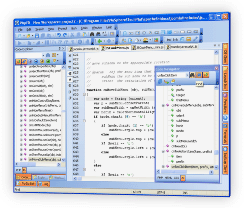
JavaScript Code tree in Code Navigator
Code Navigator provides the way to navigate through PHP, JavaScript, HTML and CSS code easily. You can select JS tab to see the display of the entire tree of JavaScript functions, classes and variables. Clicking on each element will place the cursor on that element in the source. Learn more about JavaScript Code Navigator
|
 |
 |
JavaScript Code Completion
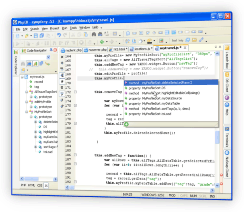
PhpED's Code Completion is working for you whether you are editing PHP, JavaScript, HTML or CSS code. IDE will display the list of available JavaScript classes, functions and variables as you start typing:
JavaScript Code completion also works for HTML DOM objects, making serious JavaScript programming really easy.
|
|
 |
JavaScript code folding
PhpED's JavaScript Code Folding is working for you whether you are editing PHP, JavaScript or HTML code. Please see the illustrations of JavaScript Code folding.
The full array of JavaScript, PHP, HTML and CSS tools can be configured and customized to your liking under Tools->Settings menu of NuSphere's PhpED. You can Learn more about PHP Tools and download free trial of PHP IDE
|




 Debugging with PhpED

 Download NuSphere PHP IDE
 Buy NuSphere PhpED® now
 Special Team4 Offer